Git是目前世界上最先进的分布式版本控制系统。
操作流程
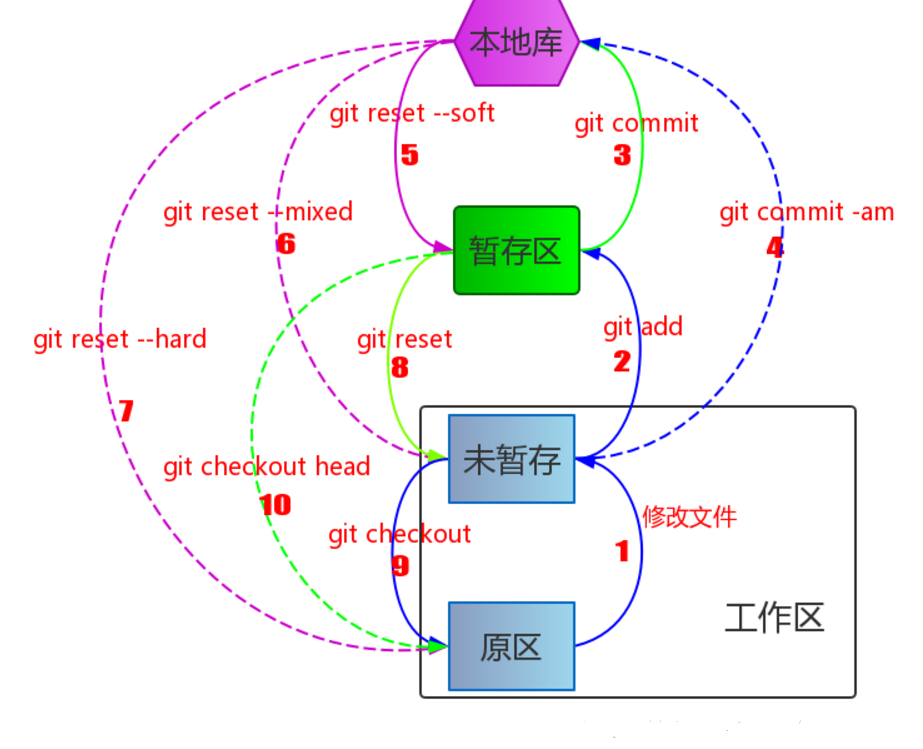
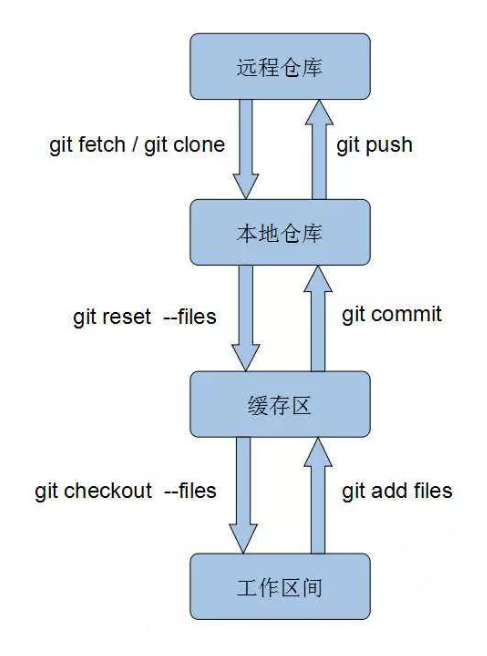
🧱 一、基本命令
1
2
3
4
5
6
| git init
git status
git diff [file]
git log
git log --oneline
git log --graph --all
|
💡 git diff 默认对比工作区与暂存区;若想对比暂存区与最新提交:git diff --cached
📤 二、提交操作
1
2
3
4
5
| git add <file>
git add .
git add -A
git commit -m "描述信息"
git commit -am "描述"
|
🚫 注意:git commit -a 仅适用于已跟踪文件,新增文件仍需 git add
🔙 三、版本回退与撤销
回退版本
1
2
3
4
5
6
7
8
| git reset --hard HEAD^
git reset --hard HEAD~3
git reset --soft HEAD^
git reset --mixed HEAD^
git reflog
git reset --hard <commit_id>
|
撤销修改
1
2
3
4
5
| git checkout -- <file>
git restore <file>
git reset HEAD <file>
git restore --staged <file>
|
⚠️ git checkout -- <file> 是危险操作,会永久丢弃未提交的修改!
🗑️ 四、删除与恢复
1
2
3
4
5
6
7
| rm <file>
git rm <file>
git rm --cached <file>
git checkout HEAD -- <file>
git restore <file>
|
🌐 五、远程仓库管理
1
2
3
4
5
6
7
8
9
10
11
12
13
14
15
| git remote add origin <url>
git remote set-url origin <new-url>
git remote -v
git remote rm origin
git clone <url>
git clone <url> -b <branch>
git push -u origin main
git push origin main
git push origin --tags
git push origin :<tagname>
git pull origin main
git pull --rebase origin main
|
🔄 git pull = git fetch + git merge
🎯 团队协作推荐 git pull --rebase 避免多余合并提交
🌿 六、分支管理
1
2
3
4
5
6
7
8
9
10
11
12
13
14
15
| git branch
git branch -a
git branch <name>
git switch <name>
git switch -c <name>
git checkout <name>
git checkout -b <name>
git merge <branch>
git merge --no-ff <branch>
git branch -d <name>
git branch -D <name>
git rebase <branch>
|
💡 --no-ff 合并会生成一个“合并提交”,便于追踪功能分支的生命周期。
🏷️ 七、标签管理(用于版本发布)
1
2
3
4
5
6
7
8
9
10
| git tag
git tag v1.0
git tag -a v1.0 -m "说明"
git tag -a v1.0 <commit_id>
git show <tagname>
git tag -d <tagname>
git push origin :refs/tags/v1.0
git push origin <tagname>
git push origin --tags
|
✅ 发布版本时建议使用 git tag -a,便于写入发布说明和签名。
🚫 八、忽略文件(.gitignore)
在项目根目录创建 .gitignore 文件,语法示例:
1
2
3
4
5
6
7
8
9
10
11
12
13
14
15
16
17
18
19
| # 忽略文件
Thumbs.db
.DS_Store
# 忽略目录
node_modules/
dist/
logs/
# 忽略特定类型文件
*.log
*.tmp
*.class
*.exe
# 不忽略例外(! 开头)
!important.log
# 注释行以 # 开头
|
强制操作
1
2
| git add -f <file>
git check-ignore -v <file>
|
📌 .gitignore 只对未跟踪文件生效。若文件已被跟踪,需先 git rm --cached <file>。
🧰 九、进阶技巧
1. 储藏(Stash)——临时保存工作现场
1
2
3
4
5
6
| git stash
git stash list
git stash apply
git stash pop
git stash drop
git stash apply stash@{1}
|
🎒 适合临时切换分支、紧急修复 bug 时使用。
2. 交互式添加(Interactive Add)
✍️ 适合一次修改多个功能,想分开提交时使用。
3. 查看某行代码是谁改的
⚠️ 十、常见问题 & 避坑指南
| 问题 |
解决方案 |
fatal: refusing to merge unrelated histories |
git pull origin main --allow-unrelated-histories |
| 推送被拒绝(non-fast-forward) |
先 git pull 或 git pull --rebase |
误操作 git reset --hard 丢了代码 |
用 git reflog 找回 commit id 再 reset |
想撤销 git commit 但未推送 |
git reset --soft HEAD~1 |
| 想撤销已推送的 commit |
git revert <commit_id>(生成反向提交,安全) |
| 中文文件名乱码 |
git config --global core.quotepath false |
🛡️ 团队协作黄金法则:
- 不要强制推送共享分支(如
main、dev)
- 提交前先
pull
- 多用
--dry-run 测试命令效果
- 重要操作前
git status + git log 确认状态
📋 十一、命令速查表(Cheat Sheet)
| 场景 |
命令 |
| 初始化仓库 |
git init |
| 查看状态 |
git status |
| 查看差异 |
git diff / git diff --cached |
| 添加文件 |
git add . / git add -A |
| 提交 |
git commit -m "msg" |
| 查看日志 |
git log --oneline --graph --all |
| 回退版本 |
git reset --hard HEAD~1 + git reflog |
| 撤销修改 |
git restore <file> |
| 删除文件 |
git rm <file> |
| 克隆仓库 |
git clone <url> |
| 推送 |
git push -u origin main |
| 拉取 |
git pull --rebase origin main |
| 创建分支 |
git switch -c feature/login |
| 合并分支 |
git merge --no-ff feature/login |
| 打标签 |
git tag -a v1.0 -m "release" |
| 忽略文件 |
编辑 .gitignore |
| 临时保存 |
git stash / git stash pop |
✍️ 示例:初始化并推送新项目
1
2
3
4
5
6
7
| echo "# MyProject" >> README.md
git init
git add README.md
git commit -m "🎉 初始化项目"
git branch -M main
git remote add origin git@github.com:username/MyProject.git
git push -u origin main
|
🎁 最后
- 使用
git config --global alias.st status 等设置别名提升效率。
- 图形化工具推荐:VS Code Git 面板、Sourcetree、GitKraken。
- 学习资源推荐:Pro Git 中文版